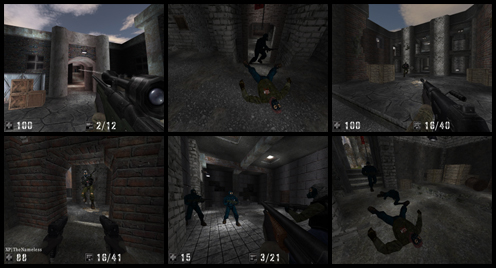
AssaultCube is a FREE, multiplayer, first-person shooter game, based on the CUBE engine by the team at Rabid Viper Productions. Taking place in realistic environments, with fast, arcade gameplay, it's addictive and fun!
With efficient bandwidth usage, it's low-latency and can even run over a 56 Kbps connection. It's tiny too, weighing in at a lightweight about 50 MB package available for Windows, Mac and Linux. On the correct settings, it can even run on old hardware (Pentium III and above).
This page should help you with getting AssaultCube installed and making it work. If you've ever played CUBE or Sauerbraten and either of them runs fine, then so should AssaultCube.
System requirements
The following are the bare minimum requirements. AssaultCube may require you to use very low graphics settings to play on a system like this. As you would expect, the more powerful than this, the better!
- Processor: Intel Pentium III or AMD K7 range.
- GFX: NVIDIA GeForce 256 or ATi Radeon R7000.
- RAM: 192 MB.
It will also require one of the following, capable operating systems:

Microsoft Windows 2000/XP/Vista/7/8/10
Plus any derivatives of these systems.

Linux
You'll need to make sure the appropriate OpenGL drivers are installed, plus these libraries (you may already have most of them installed by default):
- SDL – for AssaultCube 1.3 or later SDL2, SDL-1.2 was in use before.
- SDL_image – libSDL1.2_image before AssaultCube 1.3, after that libSDL2_image
- zlib
- libogg
- libvorbis
- OpenAL Soft
- libcurl – only before AssaultCube 1.3
sudo yum install SDL SDL_image zlib libogg libvorbis openal-soft libcurl
For Debian based systems (for example Ubuntu), type this at the command line:
sudo apt-get install libsdl1.2debian libsdl-image1.2 zlib1g libogg0 libvorbis0a libopenal1 libcurl4

Mac OS X 10.6
Version 10.6 or higher.

Any other operating systems
If you can run the neccesary libraries/drivers and are able to compile the AssaultCube source code by yourself, then you may be able to port AssaultCube onto other platforms. However, please note that we may be unable to support these platforms.
Ehancing performance for low-end machines
As previously stated, the hardware specifications shown above are the bare minimums, so you may require a bit of adjustment to get AssaultCube to run on a system like that. Of course, we recommend that you run AssaultCube on better hardware than this. Here's a few things to do to help AssaultCube can run well on such low specifications.
- Firstly, ensure you have updated your graphics drivers!
- Secondly, if you're using a laptop, plug in the power, then check if any power-saving features are hindering AssaultCube.
- In your operating system, set your resolution to 800x600 and colour depth to 16-bit (high colour).
- In your graphics driver software, turn off or turn down as many "extra" options that your graphics card allows, such as anti-aliasing and anisotropic filtering.
- Turn on "vsync" in your graphics driver software (however, turn this off again, if you find AssaultCube performs poorly).
- In AssaultCube, set the resolution to be exactly the same as your operating systems resolution.
This can be done in the Settings ⇒ Video settings... menu; under the "Screen width" and "Screen height" options. - To make things easy, we've put most of AssaultCube's graphic options in one easy slider. In AssaultCube, you can go to the Settings ⇒ Video settings... menu & slide the "Graphics detail" option to the lowest option.
These links should be able to help further if you would like to know more about tweaking your graphics card settings:
- Tweakguide: Gamer's Graphics and Display Settings Guide
- Tweakguide: NVIDIA Forceware Tweak Guide
- Tweakguide: ATI Catalyst Tweak Guide
Installing AssaultCube
Windows
Download the executable from the download page. Open it and follow the instructions.
Linux
Download the tarball from the download page. Extract it somewhere where you have permissions to read/write. If you want to set AssaultCube to play straight off your desktop application menu, you have to run install_or_remove_menuitem.sh once.
Mac OS X
Download the diskimage from the download page. Drag the contents to your Applications folder.
Other operating systems
You'll need to gather the libraries and drivers needed for AssaultCube by yourself. You will then need to compile AssaultCube from source. For this, you'll need to download the tarball labelled "source" from GitHub as well as the Linux tarball package.
More help for installing AssaultCube on different Operating Systems can be found on the wiki here.
Running AssaultCube
Windows
Use the shortcut provided. Or execute the assaultcube.bat file in your AssaultCube folder.
Linux
In a console, change your location (cd) to the main AssaultCube directory and then execute assaultcube.sh. You can also click on AssaultCube from the 'Games' section of your desktop application menu.
Mac OS X
Open the applications folder. Click on AssaultCube. Select the options you want to use to run AssaultCube and then press play.
Special notes
Files that AssaultCube writes during the game (such as screenshots, demos, settings and maps) get saved into a seperate folder known as the "AssaultCube home folder". The location of this folder differs, depending on your operating system.
Read the where is my AssaultCube home folder FAQ for more details.
0 commenti:
Post a Comment